

This is general information, not legal advice. Rules change, so check the current wording before you rely on it.
Some people pay a "registration service" 30 to 50 euros to register their balcony solar. The official registration is free and takes about ten minutes. Others skip it altogether, then find their old meter is never swapped and they have nothing to show the landlord or insurer when asked. Both mistakes are easy to avoid.
Since the Solarpaket I took effect in 2024 there is one register, one short form and no separate letter to your grid operator. This guide takes you through it in six steps: what to have ready, what each field means, and what to do when you add a battery, move house or change the kit.
Step 1: Understand what you are registering, and why
The Marktstammdatenregister (MaStR, the federal register of every power plant in Germany) is run by the Bundesnetzagentur, the federal network agency. Every system that feeds power into the grid has to be listed, from wind farms down to two panels on a balcony.
For balcony systems the rules changed in three ways in 2024:
- No grid operator notice. Before 2024 you also had to tell your local grid operator. Now the register passes the information on.
- Fewer fields. For plug-in devices the form asks only for the essentials.
- Your meter is not a blocker. You may start before your old meter is replaced. More on that in Germany's 800 W rules.
Why bother? Three practical reasons beyond "it is the law":
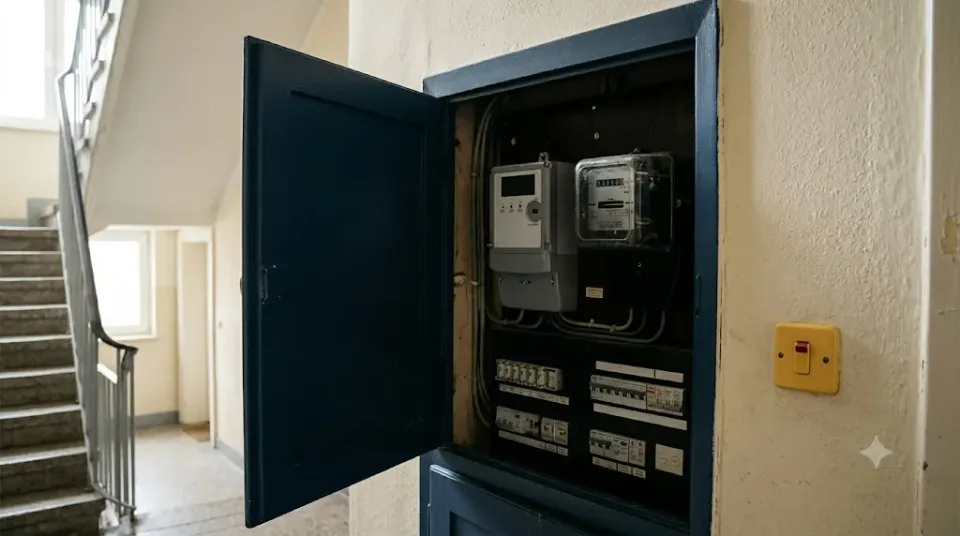
- Your meter gets swapped. The register entry is how your grid operator learns about the system and plans a meter change if you have an old one.
- You have proof. The confirmation shows a landlord, insurer or future buyer that the system was set up properly.
- You avoid a fine. Not registering is an administrative offence (Ordnungswidrigkeit). In practice the authorities have focused on getting systems listed rather than punishing small owners, but there is no reason to take the risk for ten minutes of work.
The plans for the next energy law reform, reported in July 2026, keep this duty unchanged for plug-in devices. Registration within one month stays.
Step 2: Note your commissioning date
Register within one month of switching the system on for the first time. That date is the commissioning date (Inbetriebnahme, the day the system is installed and first feeds power into your home).
Two details people get wrong:
- A quick test does not count. Plugging a panel in for five minutes on the balcony floor to see if it works is not commissioning. The clock starts when the system is mounted and running for real.
- You may register early. If you know the date you will switch on, you can register beforehand.
Write the date down when you plug in, in your phone calendar or on the receipt. It is the one detail people most often forget, and the form will not let you skip it.
Here is the whole timeline at a glance:
| When | What |
|---|---|
| Before buying | Get written consent if you rent or live in an owners' association |
| Day 0 | Mount, plug in, note the date, photograph the meter |
| Day 0 to 30 | Register in the Marktstammdatenregister |
| A day after registering | Log in and check the unit is listed |
| Weeks to months later | Grid operator checks data and swaps an old meter if needed |
| Any later change | Update the entry: battery, new panels, new inverter, move, sale |
Step 3: Gather what you need
Have these to hand before you start. It makes the whole thing quick.
| You will need | Where to find it | Ready? |
|---|---|---|
| Your name, address and email | You know this one | ☐ |
| Location of the system | Your flat address; usually the same as above | ☐ |
| Commissioning date | The day you first plugged in for real | ☐ |
| Total panel power in Wp | Panel data sheet: power per panel times number of panels | ☐ |
| Inverter power in W | Inverter label or data sheet, for example 800 W | ☐ |
| Number of panels | Count them | ☐ |
| Meter number | Printed on your electricity meter or your bill | ☐ |
| Grid operator name (if asked) | Your electricity bill; the portal usually suggests it | ☐ |
| Battery: yes or no, capacity in kWh | Only if you have one; battery data sheet | ☐ |
Two units to keep straight. Wp (watt-peak) is a panel's output under standard test light. W on the inverter is how much it may feed into your home at most. They are different numbers and the form asks for both.
A worked example: two panels rated 430 Wp each make 860 Wp in total. The inverter is set to 800 W. So you enter 860 Wp for the panels and 800 W for the inverter. If you are not sure what your kit's figures mean, our guide to what the microinverter does explains the difference.
Your grid operator (Netzbetreiber, the company that runs the local power lines) is not always the company you buy electricity from. Look for "Netzbetreiber" on your bill. The portal usually suggests the right one from your address.
bitShake SmartMeterReader
Once your grid operator fits a modern meter, this infrared reader shows what your home draws and sends out in real time. It does not work on old spinning-disc meters.
Check price on Amazon Ad - affiliate link. Prices change; check the listing.Step 4: Create your account and register as operator
- Open the official register website of the Bundesnetzagentur. Use only the official site. Registration is free, so ignore any service that asks for money to do it for you.
- Create a user account and confirm your email address.
- Register yourself as the operator (Anlagenbetreiber, the person running the system). As a private person this takes a minute: name, address, contact details.
The portal is in German. If your German is shaky, a browser translation works well enough for these few pages, but type the numbers yourself rather than trusting a translated field. The key words you will meet are Anlagenbetreiber (operator), Einheit (unit), Steckersolargerät (plug-in solar device) and Inbetriebnahme (commissioning).
You may also let someone else do it on your behalf, such as a family member who is comfortable with online forms. The entry is still in your name as operator.
Step 5: Add the unit and fill in the short form
- Add a new unit and choose solar as the energy source.
- Pick the option for a plug-in solar device (Steckersolargerät). This opens the short form. If you find yourself on a long form asking about feed-in tariffs and grid connection points, go back - you picked the wrong option.
- Enter the details from your table: location, commissioning date, total panel power in Wp, inverter power in W, number of panels, meter number.
- Confirm the grid operator the portal suggests, or pick the one from your bill.
- Submit.
Here is what each field is really asking, and the most common slips:
| Field | What it means | Typical slip |
|---|---|---|
| Location (Standort) | Where the panels are | Entering a work or billing address instead of the flat |
| Commissioning date (Inbetriebnahmedatum) | First day of real operation | Using the order or delivery date |
| Gross panel power (Bruttoleistung der Module) | All panels added up, in Wp | Entering one panel only |
| Inverter power (Wechselrichterleistung) | The feed-in limit, in W | Entering the panel total here as well |
| Number of panels | A simple count | Counting the inverter as a module |
| Meter number (Zählernummer) | The number on your meter, not your customer number | Copying the contract number from the bill |
| Storage (Speicher) | Only if a battery is connected | Ticking yes for a standalone power station |
German labels on the portal may differ slightly from the ones above, but the meaning is the same. The meter number is usually printed on the meter itself next to a barcode, and often also on your annual bill. It is a long string of letters and digits, and it is not the same as your customer or contract number.
The exact wording on screen changes from time to time. If a field is unclear, the portal's help text next to it usually explains it in a sentence. Answer what is asked and do not guess at fields meant for larger systems.
Step 6: Save, check, and tell your insurer
- Save the confirmation. You get a register number for your unit (it starts with SEE, for a power generation unit). Download or screenshot the confirmation page.
- Log in again a day later and check the unit appears in your list. If it does not, the registration did not go through and you should repeat it.
- Watch your email. Your grid operator checks the data. If something does not match, for example the meter number, it will ask you to correct it.
- File everything together. Keep the register number with your receipt, data sheets, landlord consent and photos of the mount.
What does the grid operator actually do with your entry? It checks the data against its own records, mainly the meter number and address. It then decides whether your meter needs changing. If you already have a modern meter that counts both directions, there may be nothing more to do. You will not hear from anyone in that case, and that is fine.
If you have an old spinning-disc meter, the grid operator will plan a swap, usually to a modern meter, and you should not have to pay for it. Until then you may keep using the system. Do not try to profit from a meter running backwards on purpose.
Then tell your insurer and start saving
Registration is the natural moment to tell your liability and household insurers about the system. It takes one email. See insurance and liability for what to ask.
Then make the panels pay. A registered system saves you nothing on its own. The savings come from using the power while the sun is on your balcony, because surplus sent to the grid from a plug-in system is normally not paid for. Sunslot shows your hour-by-hour output for your balcony direction, tilt, shade and city, and points to the hours to run the washing machine. Try it with your real panel figures from the form you just filled in.
Shelly Plug S Gen3
Shows what your inverter actually feeds, a quick way to confirm the 800 W setting you entered on the form. It measures one socket only.
Check price on Amazon Ad - affiliate link. Prices change; check the listing.Special cases: battery, moving, changes and power stations
If you add a battery
A battery connected to the system, directly or indirectly, is registered as a separate unit in the same register, even if it is part of a balcony kit. You can do it in the same session as the solar unit. Enter the capacity in kWh from the data sheet.
How batteries are treated for plug-in devices has been debated, and reporting through 2025 called the process unclear. The product norm for plug-in devices did not cover batteries when it was published. So check the current form and the maker's guidance when you add one. Our battery guide explains whether one makes sense for you at all.
If you move
Update the entry. If the system goes with you, change the location and enter the new commissioning date at the new address if the form asks for it. If you leave it behind for the next tenant or sell it, mark it as taken out of service or transfer it to the new operator.
If you change the system
Adding panels or swapping the inverter changes the power figures, so update the entry. Before you add panels, run the bigger setup through Sunslot and check whether the extra watts land in weak morning and evening hours or just get cut off at the 800 W cap at noon. Example: you go from two 400 Wp panels (800 Wp) to two 480 Wp panels (960 Wp). Change the panel figure. If you raise an old inverter from 600 W to 800 W, change that too.
A portable power station on its own
A power station that you charge from the socket or its own small panels, and that never feeds into your home wiring, is not a power plant and does not go in the register. It only becomes relevant if it feeds into your home wiring. See what a power station is.
If you made a mistake on the form
Log in and edit the unit. Most fields can be corrected afterwards. If your grid operator spots a mismatch first, it will email you with what to fix. A typo in the meter number is common and easy to put right. Do not create a second unit to "start again", because that leaves a duplicate in the register.
If you own a house or a flat in an owners' association
The registration works exactly the same. As an owner you are the operator. In an owners' association, the person who runs the system registers it, not the association. You still need the association's consent for the mounting, which our landlord and owners' guide covers.
| Situation | Register? | What to do |
|---|---|---|
| New balcony kit, plugged into home socket | Yes | New unit, within one month |
| Battery connected to the kit | Yes | Separate unit, same account |
| Added panels or changed inverter | Update | Edit power figures |
| Moved with the system | Update | Change location |
| Sold or left behind | Update | Mark out of service or transfer |
| Power station not connected to home wiring | No | Nothing |
Registration slips
- Paying a service. The official registration is free. Anyone charging for it is charging for typing.
- Choosing the long form. If the form asks about feed-in tariffs and grid connection points, you picked a standard solar system instead of a plug-in device.
- Mixing up Wp and W. Panels in Wp, inverter in W. Entering 800 for both is a common slip when the panels are actually 860 or 960 Wp.
- Forgetting the date. Note the commissioning date when you plug in.
- Entering your supplier as grid operator. They are often different companies. Check your bill.
- Not checking the entry appeared. Log in again and confirm the unit is listed.
- Forgetting to update. A move, a battery or new panels all need an update.
- Registering a standalone power station. Not needed if it never feeds your home wiring.
APsystems EZ1-M
An 800 W microinverter with two inputs, a common choice when replacing an old 600 W unit. Remember to update your register entry if you swap the inverter.
Check price on Amazon Ad - affiliate link. Prices change; check the listing.An example: Ben's first registration in Dresden
Here is one example household, clearly hypothetical. Ben rents a flat in Dresden. His landlord agreed in writing to two panels on the balcony railing, so he mounted them on a Saturday morning.
- Saturday 10:30: plugs in for real. Notes the date in his phone. Photographs his old meter reading.
- Saturday afternoon: opens the official register site, creates an account, confirms his email, registers as operator.
- Five minutes later: adds a unit, picks the plug-in solar device option. Enters 2 panels, 860 Wp, 800 W, his meter number, and his address. Accepts the grid operator the portal suggests, which matches the "Netzbetreiber" line on his bill.
- Submits. Saves the confirmation with the SEE number as a PDF in the same folder as his landlord's consent and the data sheets.
- Sunday: logs in, sees the unit listed. Emails his insurer.
- Six weeks later: his grid operator writes to arrange a meter swap. No cost to him.
Total time on the form: about twelve minutes. Total cost: nothing. If he had paid a registration service, he would have spent two to four months of his solar savings (roughly 150 euros a year, so about 12 euros a month) to have someone else type the same five numbers.
Registration questions
What happens if I register late?
Register as soon as you notice. Late registration is technically an offence and fines are possible in law, but authorities have so far focused on getting systems listed. Registering late is far better than not at all.
Do I have to tell my grid operator separately?
No. Since 2024, the register entry is passed on to your grid operator. You do not need to send a separate notice for a plug-in device.
Do I need to register if I have a new smart meter already?
Yes. The meter type does not change the duty. Every system that feeds into your home wiring needs a register entry.
Can I register a kit I bought second-hand?
Yes. Register it as your own unit with the date you first put it into operation. If the seller had registered it, ask them to mark it as transferred or out of service so it is not listed twice.
Is my name shown publicly in the register?
Parts of the register are public, but for small systems run by private people the personal details are protected. Technical data such as the power figures and a general location can be visible. The portal explains what is shown before you submit.
Does registering affect my taxes?
For a small plug-in system used mainly at home, registration does not create a tax filing on its own. If you are unsure about your situation, ask a tax adviser. This guide does not cover tax.